Thank You!
Payment Successful! Welcome to RSD App.
Thank you for your purchase. Your transaction is complete, and your license details are being generated.
Next Steps:
Download the software: Click the “Download” button in Pricing page to download the latest version of the RSD App installer.
- Run the file from Downloads. If Windows asks to allow changes, choose Yes.
- If you see “Windows protected your PC”
This is common for new apps. Publisher: RFSIGNAL LTD.
Click More info → Run anyway. - Finish setup — accept the licence agreement and complete the wizard. Open RSD App when done.
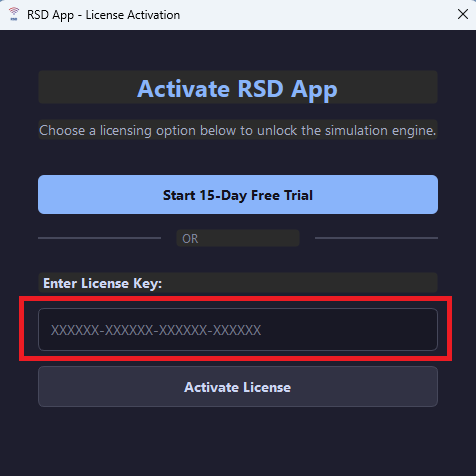
- Activate — check email from [email protected] for your licence key.
In RSD: Help → Enter License Key → paste → Activate.
You need: Windows 10 or 11 (64-bit), internet for activation.
Help: [email protected] — include your order email and a screenshot if something blocks install.
Activating Your License : Run the app, copy the key in your email and paste to the Enter License Key field.
Enjoy Your App!